Showing posts with label Spear phishing. Show all posts

Monday, 25 May 2015

Phishing Awareness Quiz

Phishing' is a common form of Internet piracy. It is deployed to steal users personal and confidential information like bank account numbers, net banking passwords, credit card numbers, personal identity details etc. Later the perpetrators may use the information for siphoning money from the victim's account or run up bills on victim's credit cards. In the worst case one could also become the victim of identity theft.

Phishing emails have gotten so convincing that even the experts can be taken in by a well-crafted fake. Cyber criminals are employing a number of different types of phishing email attacks. Usually mimicking a trusted business or personal sender, they’ll either try to get users to click to a website they’ve created to trick them into entering personal information such as user IDs and passwords or credit card information, or even using a link that, once clicked, unknowingly installs malware on the user’s PC.
You can protect yourself against phishing by understanding the points given in http://infosecaffairs.blogspot.in/2014/11/protection-and-report-phishing.html
These days, fake emails are getting more sophisticated, so it can be tough to know whether an email is real or not.We have put together 10 emails, some real, some fake. They test your knowledge, and also help educate you on how to protect yourself against it. You can test your knowledge by giving quiz from http://infosecaffairs.blogspot.in/p/blog-page_24.html

Monday, 27 October 2014

Social Engineering: The Art of Human Hacking

Social Engineering: The Art of Human Hacking

What is Social Engineering?
Manipulate people into doing something, rather than by breaking in using technical means .Social engineering is the art of gaining access to buildings, systems or data by exploiting human psychology, rather than by breaking in or using technical hacking techniques. For example, instead of trying to find software vulnerability, a social engineer might call an employee and pose as an IT support person, trying to trick the employee into divulging his password. The goal is always to gain the trust of one or more of your employees.
Kevin Mitnick said , "The weakest link in the security chain is the human element".
In a system, there is hardware, software and wetware, wetware being the human element of the system. With million dollar security systems and state of the art security technology, the first two systems may be impenetrable, but with enough patience and knowledge, asocial engineer can use weaknesses in the wetware to trick an unsuspecting target into revealing sensitive information. Social engineering is a use of psychological knowledge to trick a target into trusting the engineer, and ultimately revealing information.
Social Engineering includes scams such as obtaining a password by pretending to be an employee, leveraging social media to identify new employees more easily tricked into providing customer information, and any other attempt to breach security by gaining trust.
“You could spend a fortune purchasing technology and services...and your network infrastructure could still remain vulnerable to old-fashioned manipulation.”
Social Engineering is the art of exploiting the weakest link of information security systems: the people who are using them. Social Engineering is a method of gathering information and performing attacks against Information and Information Systems. An immense amount of loss has suffered by Organizations and Individuals from these attacks. However Social Engineering as a threat is overlooked because of low awareness and lack of proper training for people.
What Social Engineers Want?
The goal for many social engineers is to obtain personal information that can either directly lead them to financial or identity theft or prepare them for a more targeted attack. They also look for ways to install malware that gives them better access to personal data, computer systems or accounts, themselves. In other cases, social engineers are looking for information that leads to competitive advantage. 

Items that scammers find valuable include the following:
  • Passwords
  • · Account numbers
  • Keys
  • · Any personal information
  • · Access cards and identity badges
  • · Phone lists
  • · Details of your computer system
  • · The name of someone with access privileges
  • · Information about servers, networks, non-public URLs, intranet.
How does it work?
Social engineers leverage trust, helpfulness, easily attainable information, knowledge of internal processes, authority that implied or impersonated and technology to trick you. Often, they will use several small attacks to reach their final goal, bits of information pulled together into a convincing story. Social engineering is all about taking advantage of others to gather information and infiltrate an organization. 

  • Information Gathering: A variety of techniques can be used by an aggressor to gather information about the targets. Once gathered, this information can then be used to build a relationship with either the target or someone important to the success of the attack.
  • Developing Relationship: An aggressor may freely exploit the willingness of a target to be trusting in order to develop rapport with them. While developing this relationship, the aggressor will position himself into a position of trust which he will then exploit.
  • Exploitation: The target may then be manipulated by the ‘trusted’ aggressor to reveal information (e.g. passwords) or perform an action (e.g. creating an account or reversing telephone charges) that would not normally occur. This action could be the end of the attack or the beginning of the next stage.
  • Execution: Once the target has completed the task requested by the aggressor, the cycle is complete.
Types of Social Engineering
• Pretexting: Pretexting is when a person uses false or fictitious methods to retrieve a victim’s personal information such as full name, address, birthdates and social security number. The most common forms of this type of identity theft are over the phone.
Example: In 2006, HP's chairwoman and some of the members of the board of directors used Pretexting against the board of directors, employees, and journalists to find the source of the board leaks to the public media. The team of the leak investigation hired a third party firm to obtain the phone records of suspicious individuals under false pretense without their consents; an action that caused the HP's chairwoman and several directors to lose their jobs.
• Dumpster Diving: Dumpster diving is a technique used to retrieve information that could be used to carry out an attack on a computer network. Dumpster diving isn't limited to searching through the trash for obvious treasures like access codes or passwords written down on sticky notes. Seemingly innocent information like a phone list, calendar, or organizational chart can be used to assist an attacker using social engineering techniques to gain access to the network.
Example: Workers become complacent and do not think about what they are throwing away. Receipts with signatures, copies of invoices, order forms, and other items are swept into the trash as workers hurry out of the office on a Friday night or just before a holiday. Another rarely thought of items is anything placed underneath signatures. When consumers sign receipts there is often a note pad or a desktop calendar that is thrown out at the end of the month. With a person’s address, phone number, account number, and their signature, the theft is mostly completed. Most homes are easy targets as well. Many people get pre-approved credit cards and these simple get thrown away and can be used, along with other information, to open fraudulent accounts.
• Phishing: Phishing is a type of Internet fraud that seeks to acquire a user’s credentials by deception. It includes theft of passwords, credit card numbers, bank account details and other confidential information.
Example:
 
• Spear Phishing: If traditional phishing is the act of casting a wide net in hopes of catching something, spear phishing is the act of carefully targeting a specific individual or organization and tailoring the attack to them personally.
Example:
 
IVR or phone phishing: IVR or phone phishing also known as "vishing"; this technique uses an Interactive Voice Response (IVR) system to recreate a legit sounding copy of a bank or other institution's IVR system. The victim is prompted to call in to the "bank" via a phone number provided in order to "verify" information.
Example: 
 
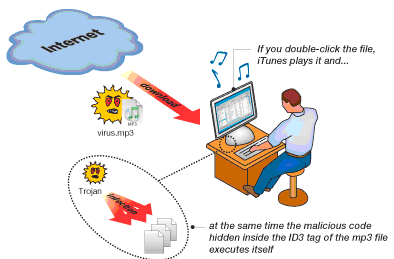
• Trojan horse: A Trojan horse is a malicious application that is designed to enable hackers to remotely access the target computer system. Trojans may arrive via unwanted downloads on compromised websites or install via online games or other internet-driven applications.
Example:
 
  • Shoulder Surfing: Shoulder surfing refers to using direct observation techniques, such as looking over someone's shoulder, to get information. Shoulder surfing is particularly effective in crowded places because it's relatively easy to observe someone as they:
· fill out a form
· enter their PIN at an automated teller machine or a point of sale terminal
· use a calling card at a public pay phone
· Enter passwords at a cybercafé, public and university libraries, or airport kiosks.
Example: An example of shoulder surfing is when renting a public locker, some people may choose a four digit PIN code which is the same as that for their credit or bank access card. A thief who obtains the locker code by shoulder surfing could then access the locker and take and use the credit or bank access card until the card account is blocked. Avoid using banking codes for other items like lockers, combination locks, etc.
· Diversion Theft: This is when a social engineer convinces a courier or transport company that they're actually you. They then arrange for the parcel to be arranged to another location nearby. Usually the courier is met at the side of the road by a smiling social engineer who takes the parcel and pretends to walk towards a house or apartment.
• Forensic analysis: Forensic Analysis is the use of controlled and documented analytical and investigative techniques to identify, collect, examine, and preserve digital information.
Example: Obtaining old computer equipment such as hard-drives, memory sticks, DVD/CDs, floppy disks and attempting to extract information that might be of use about an individual/organization.
• Tailgating: Tailgating involves getting into a physical facility by coercing or fooling staff there, or just walking in.
Example: Joe, who has forgotten his passkey into the building, shadows Barb as she ‘keys in’, and slips in after her. Often Barb does not know Joe, or even notice that Joe has tailgated after her. And more often than not, even if Barb has noticed, she will not turn around and stop Joe from tailgating. She would not feel comfortable doing that, as it might create a scene in front of others. If Joe is an intruder, he has achieved the first step in his plan - he has gained physical access into the premises.
  • Baiting: Baiting is typically done by leaving a malware infected cd, usb-key in company building, some place that would make it seem as though the item has been dropped by accident. This item might even be labeled with some kind of interesting title so as to encourage the finder to use it on his/her computer to satisfy the curiosity, only to have malware infecting the computer and give the attacker access to sensitive information and/or the company’s internal network.
  • Quid pro quo: An attacker offers his victim a gift in exchange for some action or piece of information. The attacker often does not even need to make a deal. By simply providing assistance in some way, an attacker can endear themselves to their victim, making further interrogation a simple matter.
• Reverse Social Engineering: Reverse social engineering is a method where an attacker can get their victims to call them back pertaining to something an attacker may have previously. Since a victim is calling the attacker, the victim is already at the attacker’s mercy, and it is almost impossible for the victim to tell that they are being attacked if they have already legitimately made the call back to the attacker.
Example: The attacker may cause a network failure, show up as a technical support expert just at the right moment, and then help the network operator through the problem. The operator would think of the attacker as someone of high authority that she could trust and would willingly ask or answer detailed questions that include confidential information or a way to access it.
• Fake Pop-up: The attacker’s rogue program generates a pop up window, saying that the application connectivity was dropped due to network problems, and now the user needs to reenter his id and password to continue with his session. The unsuspecting user promptly does as requested, because he wishes to continue working, and forgets about it. 

Ways to prevent Social Engineering
· Management buy-in: Budget for training. HR involved.
· Security policy: A sound security policy will ensure a clear direction on what is expected of staff within an organization.
· Physical security: The use of access badges indicating an individual’s status.
· Education/Awareness: A good training and awareness program focusing on the type of behavior required. This program might even provide users with a checklist on how to recognize a possible ‘Social Engineering’ attack.
  • Good security architecture: No rogue devices.
· Limit data leakage: For example, websites, public databases, Internet registries, and other publicly accessible data sources should only list generic information, instead of employee names.
· Incident response strategy:. For example, if a user receives a request, he should verify its authenticity before acting on the instructions he has received.
· Security culture: The creation of a security culture should be considered a long-term investment, which requires a constant effort to maintain and grow.
Conclusion: Social Engineering is the way an intruder can get access to your information resources without having to be a technical, network or security expert. The attacker can use many tactics to either fool the victim into providing the information he needs to gain entry, or obtain the information without the victim’s knowledge.
Social Engineering can be a threat to the security of any organization. It is important to understand the significance of this threat and the ways in which it can be manifested. Only then can appropriate counter-measures be employed and maintained in order to protect an organization on an ongoing basis.

Tuesday, 31 December 2013

Revealing Hacker through Malware Analysis


Background
Two days ago one of my friends contacted me and told me that his organization is receiving suspicious-looking emails. They think that the infection was to be conducted via “spear phishing” emails. Then I decided to take a deeper look into it.
I went there and saw escalation not only in numbers of created malware files but also in targets. Then I started the investigation and followed the following steps:
Before going into much deeper first we have to understand about malware and malware analysis.
What is malware?
Any software that does something that causes harm to a user, computer, or network can be considered malware, including viruses, Trojan horses, worms, and spyware.
Types of Malware
These are the categories that most malware falls into:
  • Backdoor: Malicious code that installs itself onto a computer to allow the attacker access. Backdoors usually let the attacker connect to the computer with little or no authentication and execute commands on the local system.
  • Botnet: Similar to a backdoor, in that it allows the attacker access to the system, but all computers infected with the same botnet receive the same instructions from a single command-and-control server.
  • Downloader: Malicious code that exists only to download other malicious code. Downloader’s are commonly installed by attackers when they first gain access to a system. The downloader program will download and install additional malicious code.
  • Information-stealing malware: Malware that collects information from a victim’s computer and usually sends it to the attacker. Examples include sniffers, password hash grabbers, and keyloggers. This malware is typically used to gain access to online accounts such as email or online banking.
  • Launcher : Malicious program used to launch other malicious programs. Usually, launchers use nontraditional techniques to launch other malicious programs in order to ensure stealth or greater access to a system.
  • Spam-sending malware : Malware that infects a user’s machine and then uses that machine to send spam. This malware generates income for attackers by allowing them to sell spam-sending services.
  • Worm or virus : Malicious code that can copy itself and infect additional computers.
What is malware analysis?
Malware analysis is the art of dissecting malware to understand how it works, how to identify it, and how to defeat or eliminate it.
Goal of malware analysis
The goal of malware analysis is to gain an understanding of how a specific piece of malware functions so that defenses can be built to protect an organization’s network. There are two key questions that must be answered.
· How did this machine become infected with this piece of malware?
· What exactly does this malware do? After determining the specific type of malware, you will have to determine which question is more critical to your situation.
Approaches to malware analysis
There are two fundamental approaches to malware analysis: static and dynamic.
· Static analysis involves examining the malware without running it.
· Dynamic analysis involves running the malware.
Following are the terms with their definitions those are involved during malware analysis.
  • Spear phishing: To send emails with malicious content (attachments, links, or fraudulent messages) to specific persons of particular interest
  • Exploit: Exploit is a piece of software, a chunk of data, or sequence of commands that takes advantage of a bug, glitch or vulnerability in order to cause unintended or unanticipated behavior to occur on computer software, hardware, or something electronic (usually computerized).
  • Drop: The online location where malware delivers stolen information.
  • FUD: FUD means Fully Undetectable, i.e. the program is not detected by antivirus tools
  • SFX: Self-extracting. Executable programs that are also archives, and which extract and sometimes execute the archive content when run.
  • MD5: A so-called hash – i.e. a number calculated on the basis of data that identifies these with high confidence. MD5’s in this paper are used to identify files.
Steps involved in malware analysis:

When performing malware analysis, the first step would be to have malware so that we could analyze one of the pieces of malware previously obtained. So firstly malware sample was collected from the organization.

After obtaining malware, I prepared a safe analytical environment to perform malware analysis. This is done by creating virtual environment with the help of VMware, this protects the host machine from the malware. One of the most convenient aspects of using virtualization software is its support for snapshots. They allow you to preserve the current state of the virtual machine with a click of a button, and return to it with another click. VMware Workstation support multiple snapshots, which comes in very handy for “bookmarking” different stages of your analysis, so you can move back and forth during your experiments without losing important runtime details. A snapshot of the state of the machine’s file system and the registry was taken. This allows me to quickly see what major changes have occurred on the system after execution of malware. RegShot can be used as an effective tool for this purpose. Process monitor can be used to monitor all file registry and process activity on windows system. You also need to install wireshark, a protocol analyzer that captures and decodes network traffic. Process monitor and wireshark is used to quickly reveal the behavior of malicious program.

The initial spear phishing mail contained attachment named “Important_Scan_Document” In the Folder option, click on view and then check the option show hidden files, folder and drives and uncheck the option to hide empty drives, extensions and protected operating system files.


Then I found that it’s a SFX (self-extracting executables).

I simply extracted it using Winrar.


I found two files out of which one is an executable file and other is a word file.
                                       

When I double click the SFX the installer will execute the included “tskmgr.exe” file and open the decoy document they are actually specially crafted RTF files designed to trigger software vulnerability (CVE-2012-0158) in Microsoft Common Controls, typically triggered in Microsoft Word. In CMD prompt run the netstat command. Netstat command is used to show detailed network status information. The tskmgr.exe will start in the background and establishes a TCP connection to a IP address.

Once the system got infected with the malicious program, check the system configuration to find whether tskmgr.exe will load on startup or not. I found that tskmgr.exe had automatically made entry in system start-up.

Visit virustotal.org which is a free virus, malware and URL online scanning service in which file checking is done with more than 40 antivirus solutions. I checked tskmgr.exe and it was found to be a Trojan.

Then I found that it is modifying the Windows registry entries and taking screenshots of the infected system in the background and uploading this information to a website.

Then visit networktools.nl. It is used to query whois records, ping hosts, query dns records, trace hosts, display host information, domains on ip reverse ip, check spam. When I do the domain lookup of domain I got the following information. In almost all cases, the domains registered by the attackers are “privacy protected”. This means that the registrant has paid the domain registrar to with hold identity information related to the registration. This is done almost to perfection.

However, by searching reverse IP data for the IP addresses of domains known to be involved I found a number of other domains likely belonging to the same infrastructure.

Running Wireshark on the infected system when it is trying to send screenshots to website reveals the following type of behavior

Once we noted the path of the file upload, we simply navigated to the URL and noted our own system’s screenshot being nicely saved as a png on the server.

It is interesting to note that the malware author was uploading files to a folder called ScreenShot. I found that the site had a number of directory listing vulnerabilities. The attacker doesn't have their robots.txt set to “disallow” to stop them from being crawled.

By listing the files and downloading the data present in site. I easily figured out the organization behind this cyber attack.

Many other folders were found. The names and structured of these sub-folders shows that these are the names of systems compromised.

The folders contain the IP address of the compromised system, and each of them contains text files called as Pass_logs.txt, which are captured passwords and other key phrases.

While surfing the domain, I also found some phishing pages that are used to do spear phishing. When I open the Php script of phishing pages I found the email ids where the passwords of victims were sent.

Myths about malware
· I will know if I am infected
· I can protect myself from malware by not going on porn/warez sites.
· Email Attachments from known persons are safe
· Malware is only a problem on Windows.
· Malware is created by antivirus vendors
· Most malware is spread through e-mail
· My firewall can protect my PC from drive-by-download attacks
· If you don’t open an infected file, you can’t get infected
· Cyber criminals aren’t interested in the PC’s of consumers
How to protect yourself from malware
1. Make sure your PC is updated and secure:
The software on your PC isn’t perfect. It may contain exploits or security holes that make it possible for your machine to be infected easily. You need to make sure you have these updates on your applications running or you’re increasing your risk of infection.
Of course, we also recommend always running updated Internet security that includes anti-virus, spyware and firewall. Browsing Protection is another layer of security that can keep you from clicking on the wrong links.
2. Be very skeptical of random pop-up windows, error messages and attachments:
Avoid clicking on any pop-ups that imitate your Windows error messages or error messages that come up when you try to close out of a page. If any software begins to install itself, close out immediately and run a scan of your Internet security software. You can also use our Online Scanner for free.
Avoid opening attachments at all unless you were expecting them and they come from a source you trust. If you can’t verify the source or feel anxious about a particular attachment yet have to open it, you can download it to your hard drive and have your updated Internet security scan the file before you open it.

3. Remove spam from your life:
If you get a piece of spam, let your mail software know. Identify it as spam.Better to let your software handle it.
4. Think thrice before installing any new software:
Installing software should never be an impulse decision. Some people say think twice before downloading any software from a source you do not trust 100%. I say think three time.
At the very least, Google the name of a product you want to install. If you’re at all uncertain about whether to click download, consult with a tech savvier friend or your company’s IT guy.
Conclusion
Malware attack incidents are happening very often these days. This article would assist you to reveal the truth behind them. Malware Analysis is very important step to know about the each malware used in your destruction. This enables you to think over the incidents happening around you and then you can think over the solution you can go for. There are certain myths, people follows but don’t exist in reality. By following proper methodology of Malware Analysis, you can find the attacker/hacker.
Reference

Prevention Techniques: Cross-site request forgery (CSRF)

1. The best defense against CSRF attacks is unpredictable tokens, a piece of data that the server can use to validate the request, and wh...